Understanding Skills and Sub-Agents in Claude Code
A beginners conceptual guide to Claude Code skills and sub-agents. These principles apply to other CLI Agents as well.

Agentic command-line interface (CLI) tools dominate AI-assisted coding today. Over the past year, Claude Code has become the most popular in social media and the news. However, recently people complain about burning through usage limits set by Anthropic. More so, using smaller models on complex tasks can blow through your context window, forcing you to go to use the hungrier, larger models.
Skills and Sub-Agents are key to dealing with this.
That being said, these can be confusing to understand. Luckily, what you learn for these is not limited to just Claude Code. It is also applicable to other tools like Gemini-CLI and the increasingly popular OpenCode.
Tools available today
At the moment, command-line interface (CLI) coding tools dominate. Each is slowly converging towards a similar sets of tools and options. These tools and options include:
- Skills
- Sub-Agents
- Agent Teams
- MCP Server Access
- Commands
Of these, some conventions have come into play. One is the separation between planning and building. Most of these tools now have a mode that separates the two: Plan mode and Build mode. Second, folder structure conventions have converged.
The standard folder structure is in place for global and project settings. These are usually indicated by a .cli-name/ designator. On installation, Claude Code, Gemini-CLI, and OpenCode use a ~/.claude/ , ~/.gemini/ , and ~/.agents/ parent folder, respectively. The .agents/ folder is considered the "open" standard, of which Gemini (but not Claude) adopts. So, you can, in some cases, transfer these options between the CLI tools you use.
These are global configurations. If you want project-specific specific settings, you just include these .cli-name/ folders within your project folder, which will take precedence over global configurations.
Within these folders reside these new tools and options. View them as configuration files. So, if you are interested in building out your own agentic team, you'll need to get familiar. Here are some of the most relevant (using Claude Code as an example):
~/.claude/skills~/.claude/agentsproject-directory/.claude/skillsproject-directory/.claude/skills
Now, keep in mind that these are evolving. Even just recently, Claude Code merged commands into skills, whereas Gemini-CLI still has them (along with their own quirky setup of commands).
A foray into this will require a post in itself. For now, the aforementioned skills and agents are what we'll use for organizing our agentic team. These are the most portable and, I believe, the bare minimum to get started.
Skills and what they can do
Skills took some time for me to understand. Simply put:
Skills are repeated context or actions that an agent uses for specialized work. They called by the agent, at its discretion.
These skills include at a minimum of a SKILLS.md that provides the necessary context, examples, and domain-knowledge to use the skill. More so, these skills can include extra folders for reference material and even code to execute. That last part is the most interesting.
Skills enable you to store code for execution, rather than having the agent use its limited context window for building and then executing code. This can come in handy for testing workflows.
However, to get an idea of what these can do, I've included a number of examples below. You'll see the wide range of options here as I show you examples of increasing specificity.
Code Review: High level guidelines for code review for any language. Includes industry best practices as well as your own best practices. Specific instructions on feedback to you, the user. Includes reference material in a subfolder references/ that include summaries of industry standards.
Branding Guidelines: Specifics of your brands messaging, color schemes, voice. Includes exact templates to follow in the references/ folder.
Plotly Graphs: Detailed rundown on how to use the plotly library in Python to make pretty graphs and charts. Includes instructions and code examples. Also, includes code that can be executed in the scripts/ folder of the skill. Some of these scripts plot data during development and save to a folder.
Skills are useful because they serve as a library of context and actions you can use in any project in the future. More so, they only load when the agent calls them. That way, they don't take up the limited context window unless you need them. You could have a skills library consisting of 100,000 words, yet these won't take up context unless called upon.
For your reference, here is a breakdown of the file structure for Claude Code:
project-folder/.claude
  - skills/
      - code-review/
          - SKILL.md
      - branding-guidelines/
          - SKILL.md
          - references/
              - report-template.md
      - plotyly-graphs/
          - SKILL.md
          - references/
              - plotyly-best-practices.md
          - scripts/
              - multivar_timeseries.py
              - bar_chart.py
Sub-Agents: where your AI get's specialized
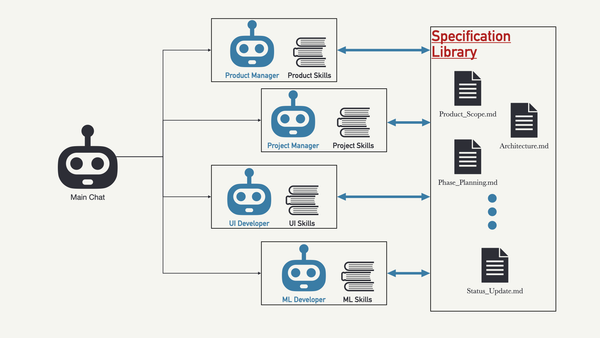
Sub agents are the next level. Many of these CLI tools allow for the spin-up of other agents, each with its own context window. Often times, these are called implicitly by the main the main chat window (main agent).
Now, what I am about to explain appears to muddy the waters between skills and sub-agents. It may even beg the question: why use skills at all if sub-agents exist?
Sub-agents, today, are used to make specialists. Specialists that sound very much like the skills mentioned above: A Code Reviewer, a Branding Expert, a Computer Vision Expert. These, however, can be preloaded will skills, making the work you did with skills re-usable and modular.
Sub-agents are defined also in a subfolder of .toolname/agents. For example, in Claude Code, Gemini-CLI, and OpenCode, they have the following .claude/agents, .gemini/agents, and .agents/agents, respectively. They are then configured with a AGENT.md file.
What makes these powerful is their specificity. Sub-agents can be configured with skills and also constrained to certain tools and models. To get an idea, let's look at an example AGENT.md file for a Data Science Expert.
---
name: datascience-expert
description: Analyzed data and create data science code for users.
tools: Read, Write, Edit, Bash
model: sonnet
skills:
  - pandas-dataframes
  - plotyly-graphs
  - image-saving
  - brand-guidelines.
---

Anaylyze data given to you by the user. Ask any clarifying questions about the analysis so the output aligns with the goal of analysis. Output data in graphs and tables according to the brand guidelines. If analysis is to be repeated in the future, generate and save code to the code base.
This brings me to another insight, you can use such sub-agents to modify skills. For example, if the Data Science Expert generates code that will be reused again, this expert can be asked to add that code to a scripts/ folder inside of a specific skill. Now you have a self-improving system.
Where to Start
Skills are the easiest to start. Many have put their own skills on the web. Just be sure to get them from a reputable source. Vercel and Anthropic post their owns skills. They even post to a website called skills.sh. The nice thing about this site is that it gives you a means of installing via npx skills. The site also gives you security check for malicious code. Be sure to check this! It is really important to make sure skills don't give your agent malicious capabilities.
Start with a few skills downloaded from skills.sh. Get the all-important skill-creator skill by Anthropic. This includes building out skills with the correct formatting and folder structure. It also has some built-in testing methods. Then, practice building out skills within your project for your CLI of choice. Do it on something non-critical and start just playing around to get the hang of it.
Don't worry. It feels like you are behind, but you are not. You're actually at the cutting edge. Don't believe anyone who says they have it figured out.
Living Reference
This is a living document. It will be updated as I get further educated and as things change.
References
- Claude Code Docs: Extend Claude with skills
- Claude Code Docs: Creating custom subagents
- Skills.sh - A Resource for skills that includes security checks
- Skill-Creator skill by Anthropic